Useful Tasks & Plans is available now. We built it after finding ourselves using parts of Microsoft To Do, Todoist and Microsoft Loop to organise work that really belonged together.
A task in one place. The notes behind it somewhere else. A useful document saved for later, provided we could remember where later was.
Each application had things we found useful. The difficulty was keeping the connections between them clear. We could organise the actions, develop the thinking and collect the reference material, but bringing those pieces back together was another job to keep on top of.
That experience became the starting point for Useful Tasks & Plans: a Windows desktop app for tasks, projects, notes, reference files and daily planning.
When the work spreads across the tools
Using Microsoft To Do, Todoist and Loop meant drawing boundaries around different parts of the work. What belonged on a task list? Where should the longer project notes live? What should happen to a useful link once we had read it?
Those are reasonable questions. The trouble starts when you have to keep answering them while trying to get something done.
You come back to a task and need to find the brief. The brief refers to a document. The document prompts another action, which needs to make its way back into the task list. Keeping everything current takes attention of its own.
For our way of working, we wanted the next action and the information behind it to be closer together. A place to develop an idea, decide what happens next and keep the useful material as the project moves along.
A task often needs more than a title
Suppose you are updating a page on your website. “Update the page” gets the job onto a list, but there is quite a bit behind it.
You might need draft wording, a list of changes, a reference link, a document with the agreed details and a few smaller steps to work through. When you return to the job tomorrow, all of that still matters.
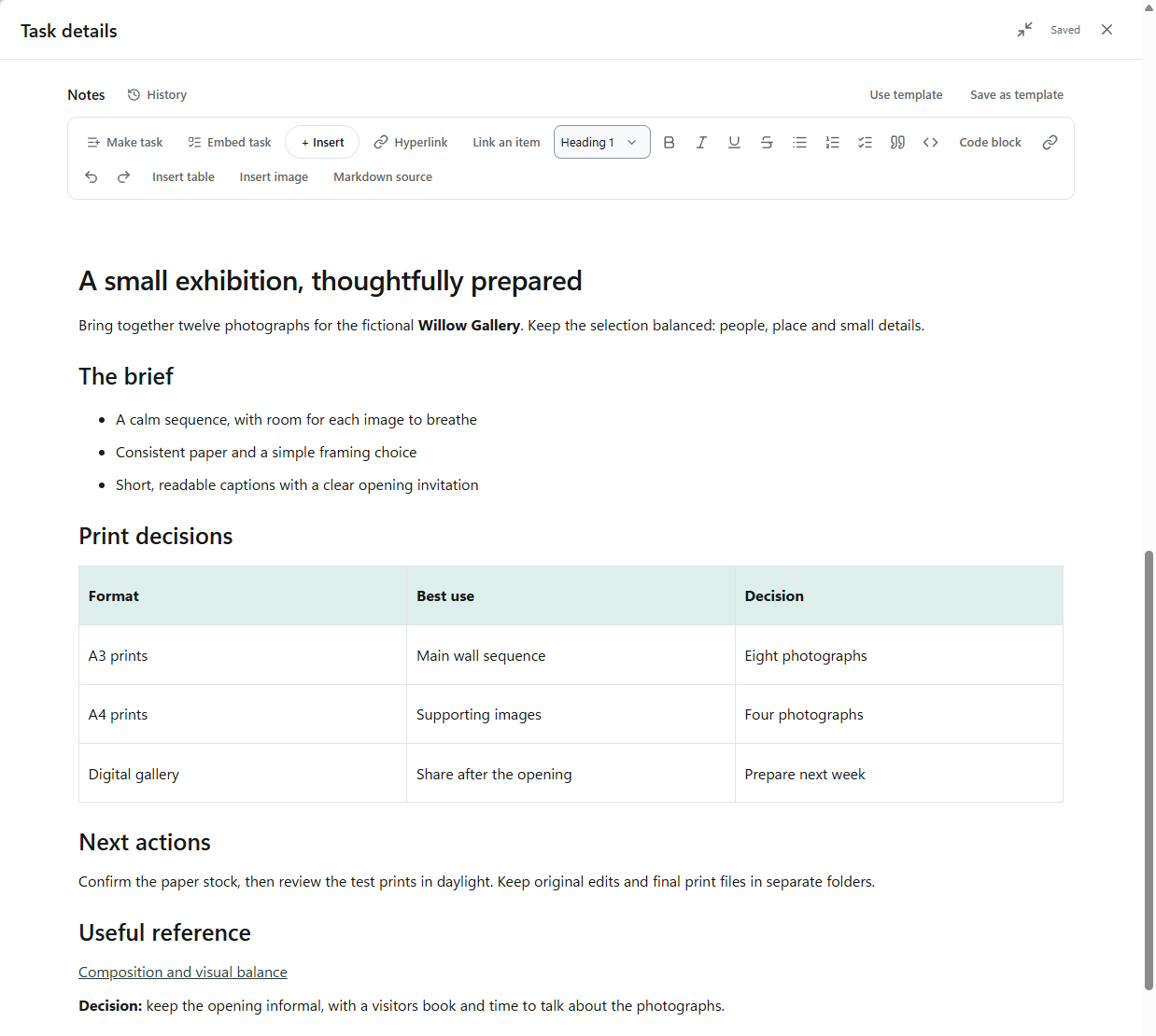
In Useful Tasks & Plans, a task can hold rich notes with headings, lists, tables, images and links. Mini-steps help you break it down. You can save a useful note layout as a template for the next time you do similar work.
The aim is to make returning to a piece of work easier. Open the task and pick up the thinking where you left it.
Give the project somewhere to live
Some work fits into a single task. A larger project needs a little more structure.
Groups and subgroups let you organise tasks around a client, a project or an area of life. You can look at the work as a list, a board or a calendar, depending on what you need to see.
Reference material has a place too. The Library holds useful links, snippets and files, which you can organise with tags and Groups. A document you want to keep does not need to sit on your task list looking like something unfinished.
That distinction mattered to us. Tasks need action. Reference material needs to be findable. Keeping both in the app helps them support each other while giving each a clear purpose.
Make a plan for the time you actually have
Bringing everything together creates another question: what should you put in front of you today?
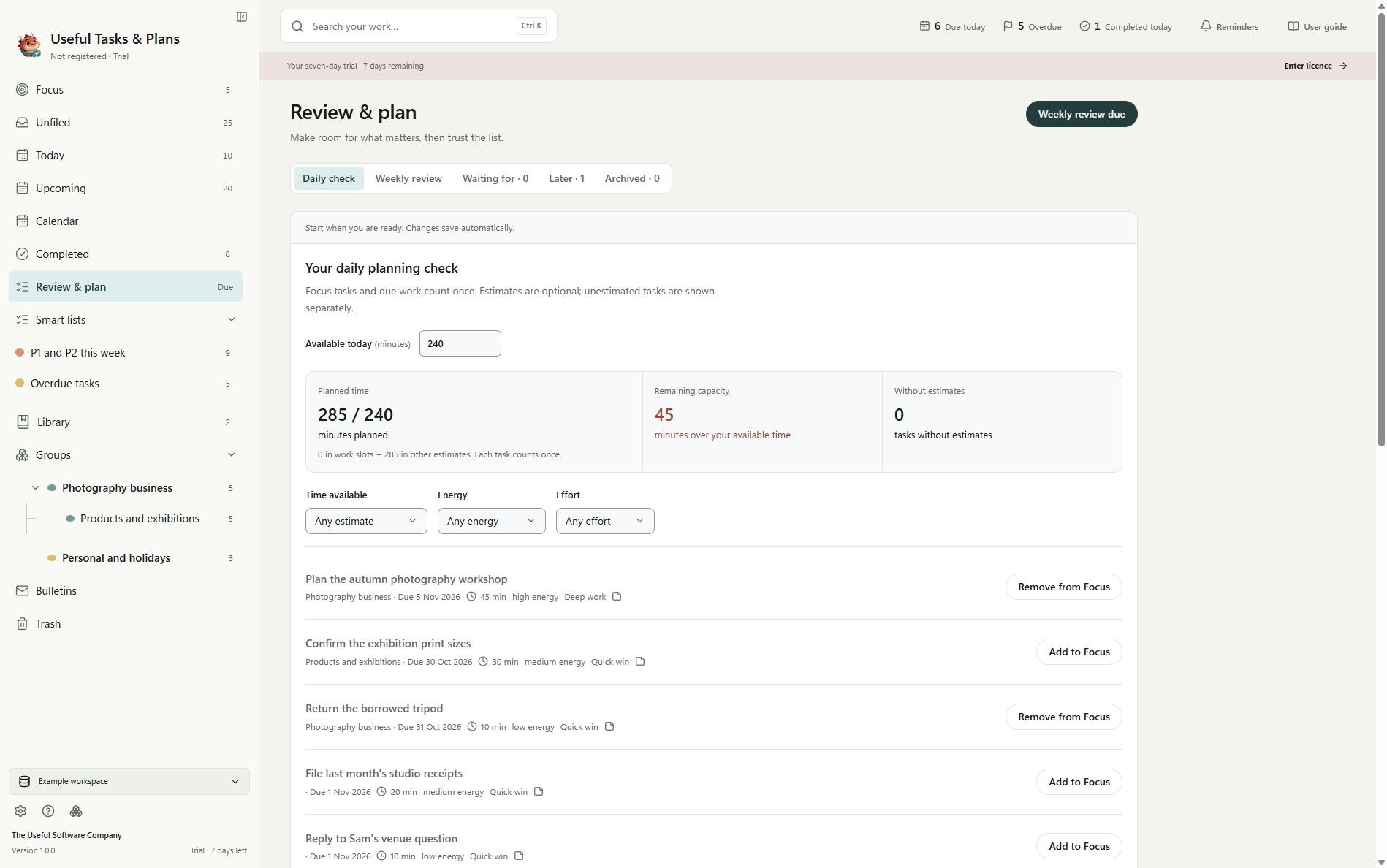
Focus lets you choose a manageable selection of tasks without moving them out of their Groups. Their dates, notes and other details stay with them.
The daily planning view uses your own time estimates to compare the work you have planned with the time you have available. It gives you a way to spot an overfull day before adding another job to it.
Your estimates will sometimes be wrong. Plans change. Having a visible starting point makes it easier to decide what to move, what to keep and what deserves your attention next.
A desktop app, with your work on your computer
Useful Tasks & Plans stores your tasks, notes and embedded reference files in a local database. You choose where to save it, and backups are available from inside the app.
Everyday work is available offline, including locally stored files and the built-in User guide. Downloads, purchases, update checks and online features still need an internet connection.
Version 1 is for Windows PCs. It does not provide automatic synchronisation between devices or simultaneous editing. If your working day depends on moving between a phone and several computers, or on several people editing together, take that into account when deciding whether it fits.
Our product page explains how it works, and the download page covers the system requirements and installation.
Try it with one real piece of work
The seven-day trial gives you time to explore the example data or start with your own tasks, notes and projects.
We would suggest choosing one piece of work you already understand. Add its next few actions, write the notes you would normally keep elsewhere and bring in a useful reference. Then come back to it the following day.
Can you see what needs doing? Can you find the information behind it? Does the plan look reasonable for the time you have? Those are useful questions to judge the app by.
A perpetual Version 1 licence costs £49, plus applicable taxes, with every Version 1.x update included and no monthly software subscription. A future major Version 2 may be a separate paid upgrade.
Useful Tasks & Plans grew out of wanting the pieces of our own work to sit more comfortably together. If you recognise the same problem, we hope you will find it useful too.
Explore Useful Tasks & Plans or download the seven-day trial.