A new app idea can grow a long feature list very quickly. A useful first version starts with a clearer question: what should someone be able to get done, from beginning to end?
Perhaps you have an idea for a customer portal. Or your team needs an internal application that does not exist yet. Before long, the list includes dashboards, messages, reports, payments, a mobile app and a connection to the accounts system.
Each suggestion may have a good reason behind it. Together, they can make the first version difficult to describe, build and judge.
We find it more useful to begin with one job the application should help someone complete. That gives the design, the build and the first round of testing a shared purpose.
Start with a useful result
“We need a customer portal” describes a type of software. “Our customers should be able to send a request and see what happens next” describes something it needs to achieve.
Ask who the application is for, what starts the task and what a finished result looks like. Include the people receiving or checking the information as well as the person filling in the first screen. This reflects the GOV.UK Service Manual’s guidance on understanding users and their needs.
Follow one job from beginning to end
Imagine a design-and-print business creating a portal for existing customers. This is a fictional example, rather than a client case study. Its first useful job might be:
A customer sends a request with the details the studio needs.
Someone in the office reviews it and asks for missing information.
The office records a response and the next step.
The customer can return to see the current status.
That gives us a route to design. It also raises practical questions about who can see each request, who handles it and how people know that something has changed.
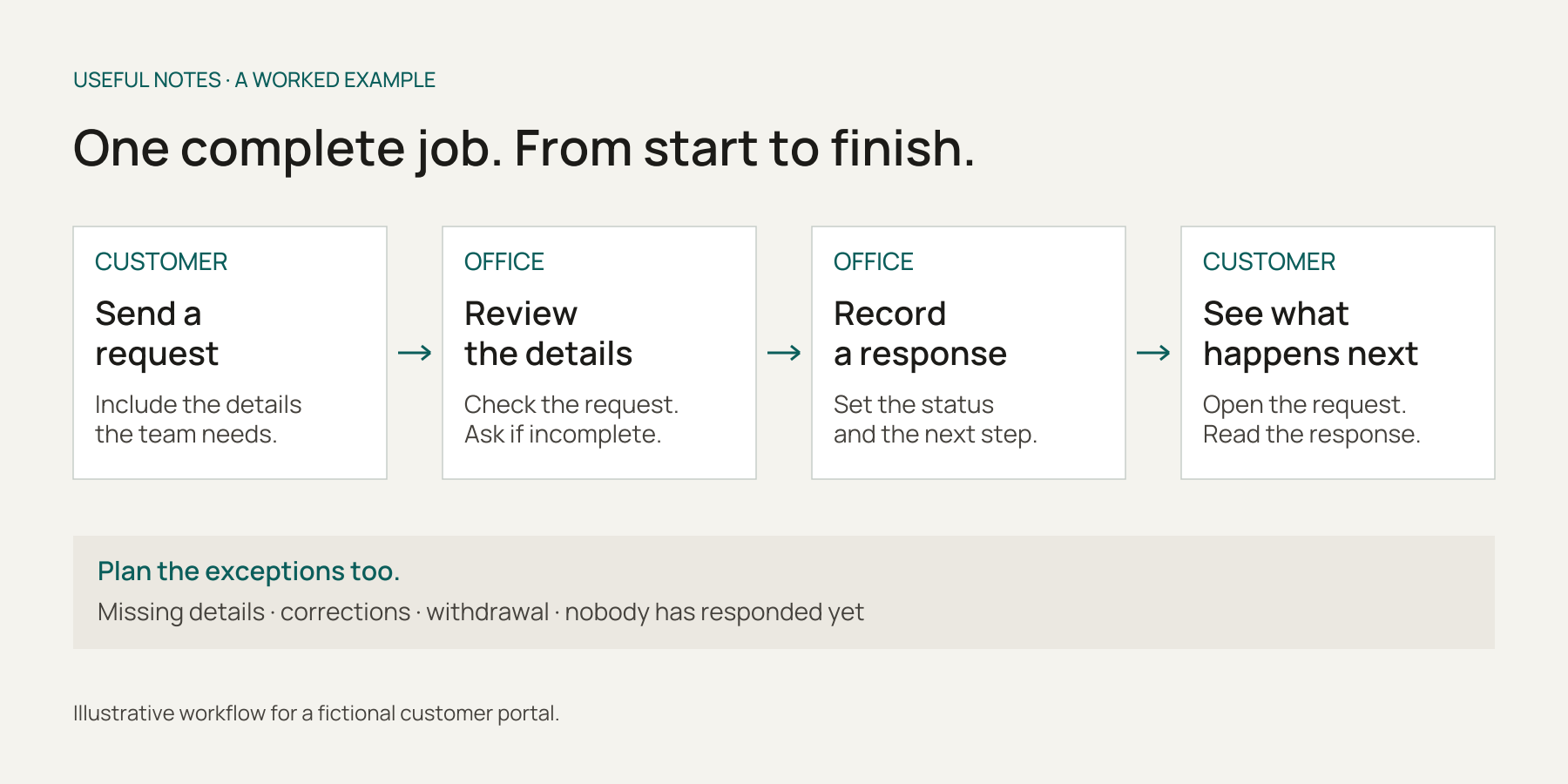
One complete job, including the handover between customer and office. A fictional example to help define a first release.
Keep the whole job in view
A request form on its own may look like a useful first release. Follow the information a little further. Where does it arrive? Who picks it up? Can they ask a question? How does the customer find the response?
For this example, the first version could use a simple office list and clear status labels. It does not need a complicated dashboard to make the route work. It does need someone to be responsible for the requests that arrive.
If a step stays outside the application, make that explicit. An email notification and a manual office review might be a sensible arrangement. Everyone should understand where the software’s part ends and a person takes over.
Choose what belongs in version one
Work through each proposed feature and ask:
Is it needed to complete the job we have chosen?
Does another essential step depend on it?
Could a simpler approach work for the first release?
What would happen if we left it until later?
The portal may need request submission, an office response and a customer status view. Live chat, elaborate reporting and additional request types could wait if they are not essential to that job.
The answers depend on the business. A connection to another system might be optional in one project and essential in another. Write down the reason for each decision. The Service Manual’s prioritisation guidance is a useful reminder to consider support and maintenance work alongside new features.
Include the ordinary exceptions
What happens if the request is incomplete, sent twice or withdrawn? What if the person reviewing it is away? Can a customer correct a mistake without starting again?
Choose the exceptions the first release needs to handle. Agree how the remaining cases will be dealt with. Those decisions are part of making the application useful in a working day.
A smaller scope still needs solid foundations
Calling something “version one” does not make the everyday responsibilities disappear. For the customer portal, we would still need to think through:
Access: who can sign in, what each person can see and who can change it. Customer records need to stay within the right accounts.
Information: what must be stored, what can be left out and how mistakes are corrected.
Recovery: how important records are backed up, restored and checked. The NCSC’s backup guidance provides a useful starting point.
Usability: clear labels, understandable errors and core tasks that people can complete using the devices and ways of interacting they need. W3C’s accessible forms guidance covers labels, instructions and feedback.
Running it: who responds to requests, who helps users and how problems with the application are noticed and handled.
The detail will vary with the information and the work involved. These needs should be discussed while the first release is being planned.
Use a prototype to explore, then test the working application
A sketch or clickable prototype can help people try the proposed screens before the full application is built. Ask someone to follow a realistic task and see where they hesitate.
A convincing prototype is not proof that the live application is ready. GOV.UK distinguishes prototype code from production code. Access checks, saved records, integrations, recovery and other operational details need their own work and testing.
When there is a working version, follow the whole task with representative users and suitable test records. Try an incomplete request, a correction and an account that should not be allowed to see another customer’s information.
Agree how you will judge the first release
Before launch, decide what you want to learn. Can customers submit a usable request? Can the office pick it up? Can the customer understand the response without having to chase it?
Look at task completion, questions people ask and the points where they need help. The Service Manual’s measurement guidance recommends combining performance information with user research. Use what you learn to decide what deserves attention next.
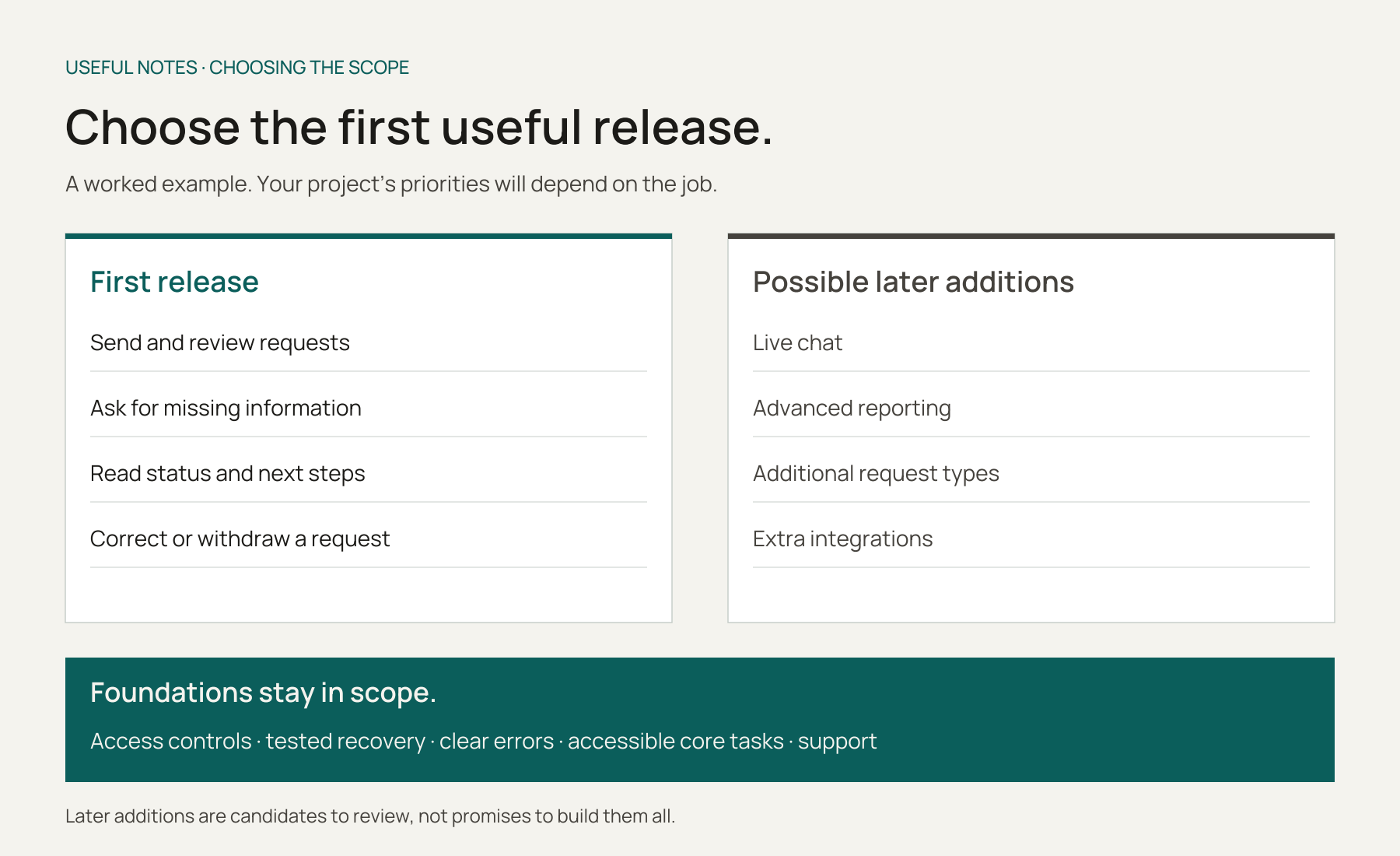
Choose features around a complete task. Keep the foundations in the plan, and review possible additions as you learn.
Write a short version-one brief
You do not need to settle every screen or technical choice before speaking to a developer. A page covering these questions gives the conversation a useful shape:
The people: who is the application for?
The job: what should they be able to finish?
The route: what happens between the first step and the result?
The boundaries: what is included, what is outside the software and what can wait?
The essentials: what information, access, connections and operational support does it need?
The evidence: how will you check whether it helps?
A first version can still be a substantial project. Its size follows from the job, the users, the dependencies and the risks. A clear scope gives everyone a more useful basis for discussing the work, costs and timing.
The same thinking helps when modernising a system
You can use these questions for a new application or a replacement for older software. In a replacement project, there is an extra job: identifying the records, reports, rules and connections that need to keep working through the change.
You may need a phased transition or temporary connections between systems. Choose the first useful release with those dependencies in view.
Start with the job you want the app to do
At The Useful Software Company, we build new applications from the ground up and modernise existing systems for small businesses and larger organisations. We begin by understanding the people and the work, then help define a first release with a clear purpose.
If you have an idea, tell us what you would like to build. If you are preparing for that conversation, our note on what to bring to a first conversation is a useful companion. You can also explore how our bespoke projects work.