Your FileMaker system may hold years of useful knowledge—and a few years of workarounds. Before replacing it, work out what deserves to stay, what needs attention and what would make the team’s day easier.
Your FileMaker database probably began by making something easier. Customer details stopped living in three places. Jobs could be found. Someone finally made the invoice look right.
Years later, it may contain much of the way your business works. There are useful screens, familiar reports and a button everyone knows to leave alone. There may also be spreadsheets, paper forms and little workarounds growing around it.
If you are searching for FileMaker alternatives, start by identifying which parts have become awkward. You might need a better version of the existing application, a connection to another tool or a replacement. Each is worth considering.
Is FileMaker still supported?
Yes. Claris continues to develop FileMaker. Its current release notes include FileMaker Pro 2026 updates. That was checked on 14 October 2026. The age of your own installation is a separate question: check its version, supported operating systems and compatibility with the server before planning an upgrade.
FileMaker already spans several ways of working. FileMaker Pro runs on macOS and Windows; FileMaker Go provides access on iPhone and iPad; WebDirect provides browser access to hosted applications. FileMaker Server and FileMaker Cloud are hosting options. See Claris’s platform overview.
So needing a Mac, an iPad or browser access does not automatically mean leaving FileMaker. The useful question is whether your application has been designed, hosted and maintained for the work you now need it to do.
Your FileMaker system is more than its records
A customer table is only part of the picture. Layouts guide people through jobs. Relationships connect records. Calculations and scripts apply rules. Reports turn information into something the business can use.
Then there are the things around the application: documents, photographs, email routines, accounting exports, plug-ins and scheduled tasks. A booking may look like one row on screen while depending on several of these pieces.
That is why exporting the data is only one part of a move. The replacement also has to preserve the useful behaviour, or give the team a better way to achieve the same result.
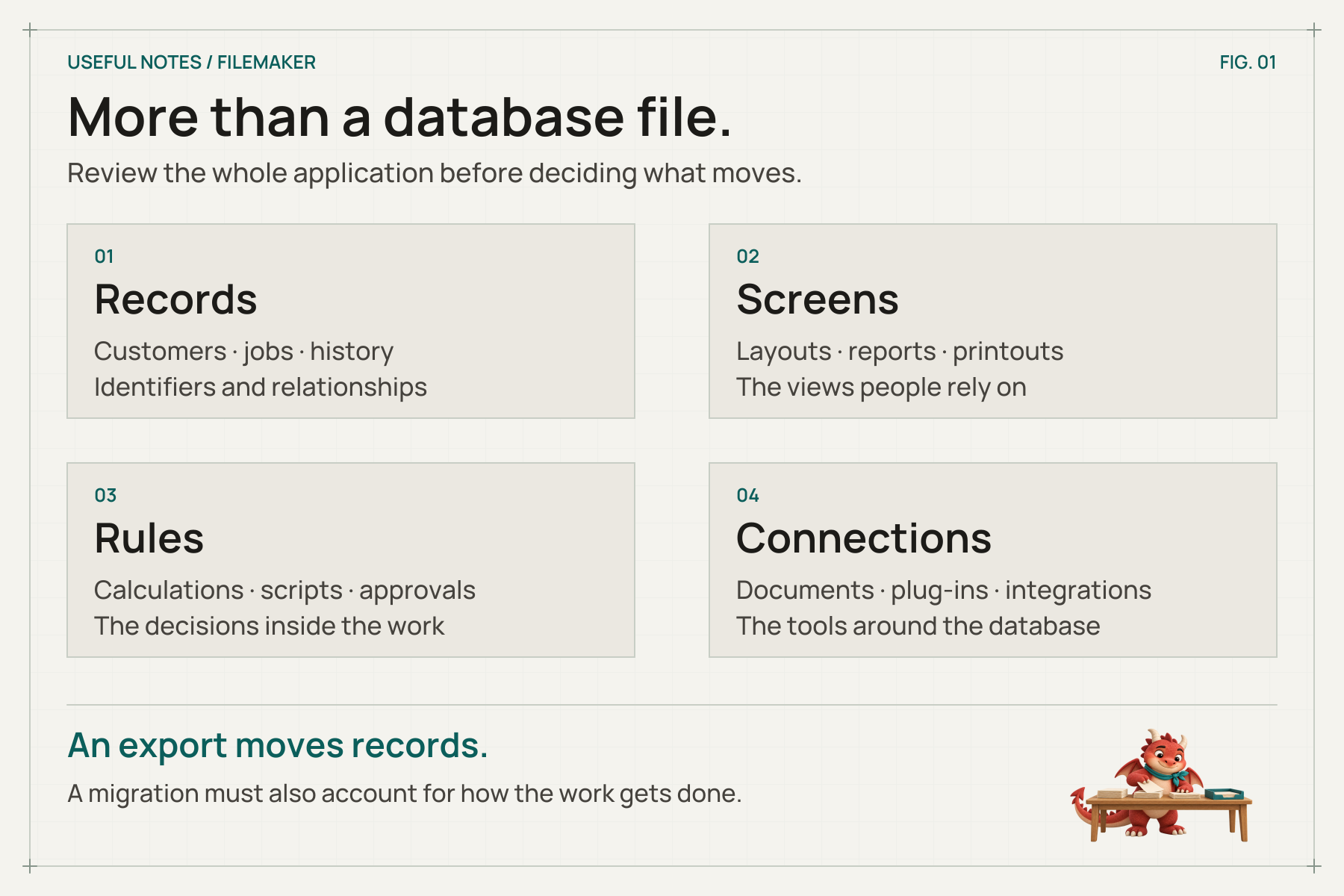
A useful review includes the records, the screens, the rules and the things connected to them.
Five signs the application needs a review
These are reasons to investigate. None, on its own, proves that the platform needs replacing.
1. The real workflow happens somewhere else
FileMaker holds the official record, but the team uses a spreadsheet to see what is outstanding, a paper form to record a visit and a message thread to agree a change.
Follow one ordinary job from start to finish. Note each place someone copies, checks or chases information. You may find that one missing screen or connection accounts for much of the frustration.
2. A simple change has become difficult to trust
A new price, status or report takes longer than expected because nobody knows what else it might affect. The person who built it has moved on, or the documentation describes a much earlier version.
Start by establishing who can maintain the application, where the editable files are kept and which routines matter. A recently built system needs this ownership just as much as an old one.
3. The screens no longer fit the people using them
An office layout with dozens of fields can be frustrating on a small device. Someone collecting a signature needs a different view from someone reconciling a month’s bookings.
FileMaker WebDirect can deliver a hosted application through a browser, but it has its own behaviour and design considerations. Check the WebDirect architecture guide and test the actual tasks, devices and supported browsers. A desktop layout appearing online does not tell you how well it works for the person using it.
4. Working away from the office needs a clearer plan
Think about what must happen when the connection drops. Does someone need to read a job sheet, enter inspection results or capture photographs? Who might change the same record meanwhile?
FileMaker Go can work with a local file offline. Claris explains that changes to that local copy do not automatically update the remote file. Offline work therefore needs an agreed way to transfer changes, resolve clashes and confirm they arrived. A replacement application needs that design too.
5. Access, recovery and running costs are unclear
Write down who should see, edit, export and delete information. FileMaker has privilege sets, including controls over records and fields; the question is how your application uses them. Claris’s security guidance explains how these controls apply across access methods. Test the intended restrictions with representative user accounts.
Check who monitors hosting, applies updates and tests recovery. Our note on a backup you can actually find again is a useful starting point.
Then compare the full cost of keeping the system useful: licences, hosting, development, support and manual work. Use a current quote for the users and access arrangements you need. Moving to another platform will bring its own costs and maintenance responsibilities.
FileMaker alternatives: three routes worth considering
Improve the FileMaker application you have
This may be the sensible route when the underlying process works, the records are in good order and the main problems are a handful of screens, reports or routines.
A review could lead to clearer layouts, better validation, documented scripts, revised permissions or a more suitable hosting arrangement. An experienced FileMaker developer can assess how much of the application is worth retaining and where changes are needed.
Try the improvement on a copy first. Agree what should become easier, and ask the people doing the work to check it. An upgrade and an application redesign are different jobs; either may be useful, but one does not automatically complete the other.
Keep FileMaker and connect the missing piece
Sometimes the database works well internally while one part of the process needs a different interface: a customer enquiry form, a supplier connection or a focused tool for staff on site.
The FileMaker Data API lets other applications work with data hosted by FileMaker Server or FileMaker Cloud. That can make a staged connection possible without replacing everything at once. It requires development, appropriate permissions and a suitable deployment.
Define which system owns each piece of information. Decide how updates are identified, what happens after a failed transfer and who investigates a mismatch. An integration should reduce the work of keeping records in step.
Move to a product or application that fits better
A ready-made product may be a good fit if your needs are well covered already. Try a complete working day in it: an ordinary job, a cancellation, a correction and the report you actually need. Check exports, permissions, integrations and ongoing charges.
Other app-building platforms may also suit the work. Compare their licensing, hosting, device support and maintainability against the same requirements. Another platform still needs someone to design and look after the application.
Bespoke software becomes worth exploring when the workflow is distinctive and the team spends too much time bridging gaps between products. The result could be a Windows or macOS desktop application, a web application, an iOS or Android app, or a combination.
The right choice follows the job, connectivity, people and support arrangements. Our practical software examples show how that can look in everyday work.
Start with one piece of work that people recognise
Consider an illustrative equipment-hire business. FileMaker holds customers and bookings. Staff use a paper sheet for equipment handover, then email photographs of returned items to the office. Someone matches the photographs to the booking and updates the record later.
A useful first improvement could let staff record the handover and return against the same booking, with the required checks and photographs attached. Depending on the application, that might be built within FileMaker, connected to it or included in a replacement system.
Test the awkward return as well as the straightforward one: a missing item, a changed date or two people working on the same booking. A successful example gives you something concrete to judge before committing to a larger change.
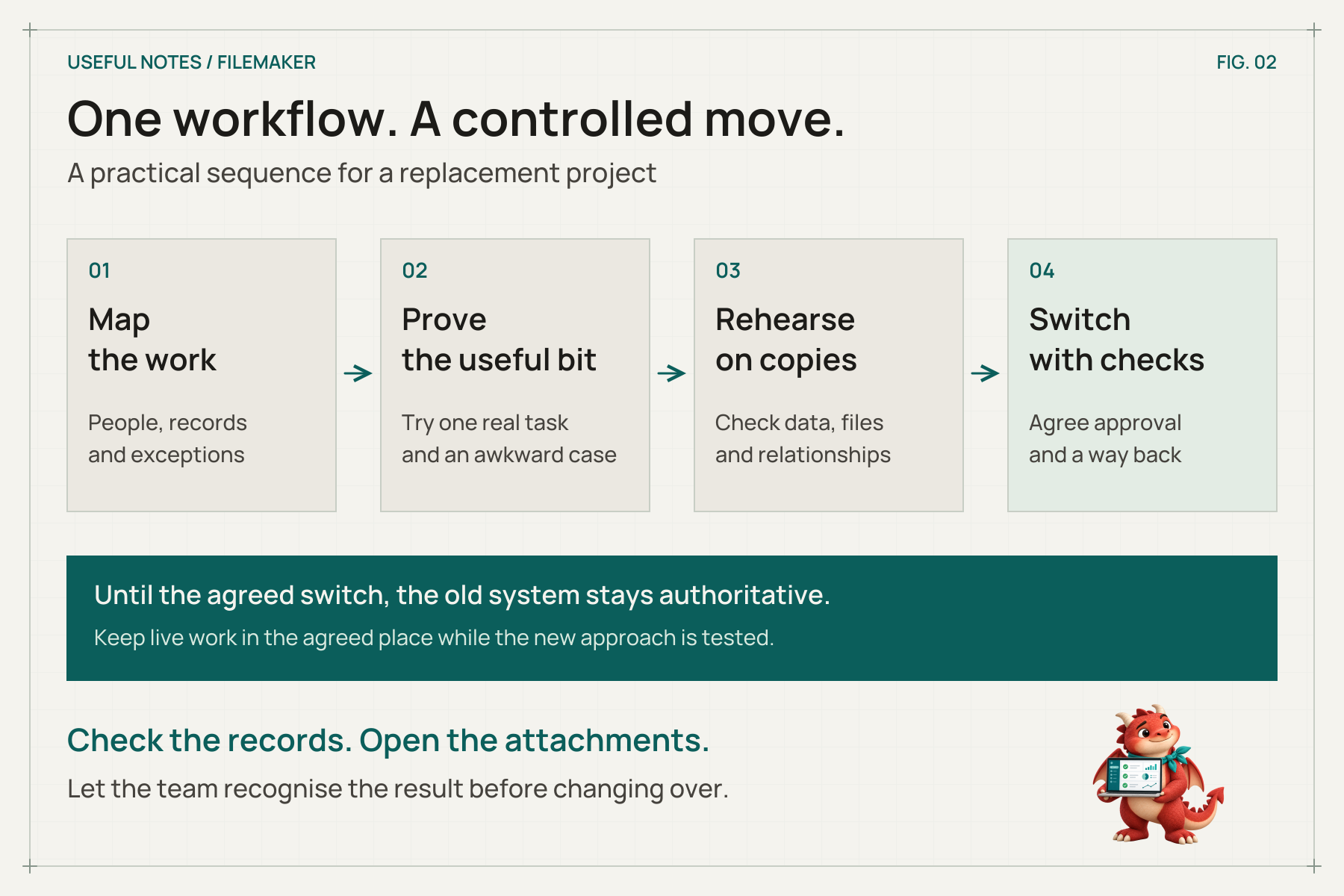
Rehearse before the switch, and agree where the team should enter new information at every stage.
How to migrate from FileMaker without losing what matters
Even if you have decided to replace the application, give the move its own plan. The important questions are what must arrive, how you will know it is right and how the business keeps working during the change.
Map the records and the behaviour
List the tables and the identifiers that connect them. Include documents and photographs, important calculations, scheduled jobs, printed layouts, integrations and reports. Ask which old records still need to be searchable and which can be archived.
Claris documents exporting FileMaker data and exporting field contents, including container files. An export does not recreate the application in another technology. Check attachments separately and preserve the link between each document and its record.
Prove the difficult part before the whole system
Use a representative, appropriately protected sample to test the workflow with the most uncertainty. Include permissions, an exception and a report. Let the people who use the existing application try it on the devices they actually use.
Make the acceptance check specific: a returned item can be matched to its booking, photographs can be found and the office can see what still needs attention.
Rehearse the migration on copies
Check record counts, important totals, dates, identifiers and relationships. Open sample attachments. Compare representative reports and test whether different users can see only what they should.
Allow for corrections and another rehearsal. A file importing successfully is a technical milestone; the business still needs to recognise the result.
Choose when the new system becomes authoritative
Agree who approves the switch, when editing stops in the old system and how any final changes are transferred. Record how you would return to the previous arrangement if checks fail, including what happens to entries made after the switch.
Keep a clearly labelled archive where needed. Plan training, support, recovery tests and documentation before launch. A staged change can be useful, provided everyone knows where each part of the work belongs.
Common questions about replacing FileMaker
Can we keep our existing data?
Often, yes, subject to access and inspection. Relationships, historical codes, attachments and calculated values need care. Start with a sample migration and agreed checks so the answer is based on your actual files.
Can we keep using Macs?
Yes. FileMaker itself supports macOS, and possible replacements include Mac desktop software and browser-based applications. Include Windows users, mobile users and any offline work in the same discussion.
Would putting FileMaker in the cloud solve the problems?
Changing hosting may help with access or administration. It will not automatically simplify an overcrowded layout, document a hidden rule or remove duplicate data entry. Be clear about which problem the hosting change is meant to solve.
Is there a direct conversion to a custom web application?
Plan for the data, screens, scripts and reports separately. Exporting records can help with migration, but the behaviour people rely on needs to be understood and implemented in the target application. Assess any conversion tool against real examples before relying on it.
What does a FileMaker replacement cost?
The file size is a poor measure of the work. Workflows, permissions, integrations, reports, migration checks and the required support all matter. Define a first phase and compare the full running cost of the options before requesting a detailed estimate.
Bring us the part that makes the day harder
You do not need to arrive with a replacement platform already chosen. Tell us what your FileMaker system does, what still works well and where people have started working around it.
We can help explore software shaped around your work and a practical route from the system you have. Use a blank form or made-up example for the first conversation, rather than passwords or live customer records.
Our project-planning note will help you prepare. When you are ready, tell us about the awkward bit.
Technical details checked against the linked Claris documentation on 14 October 2026. The assessment questions, illustrative example and planning approach are the Useful Software team’s own.