
Course & booking management for independent trainers
Run the training. Not the admin.
Plan courses, manage attendees, track payments and expenses, prepare communications, and understand what is profitable—all in one private Windows desktop app.
- Full 7-day trial
- £99 one-off
- No monthly subscription
- Works offline
Available now for Windows 10/11 (64-bit) macOS version planned
Seven full days from first launch. Your business data stays on your computer.
- Professional trainers
- Coaches & instructors
- Tutors & educators
- Creative workshop leaders
- Class & course providers
Training is personal. The admin is familiar.
Your work has its own language. So does the app.
Call them courses, classes, workshops, sessions, events or programmes. Useful Course & Class Manager adapts to the way you already work.
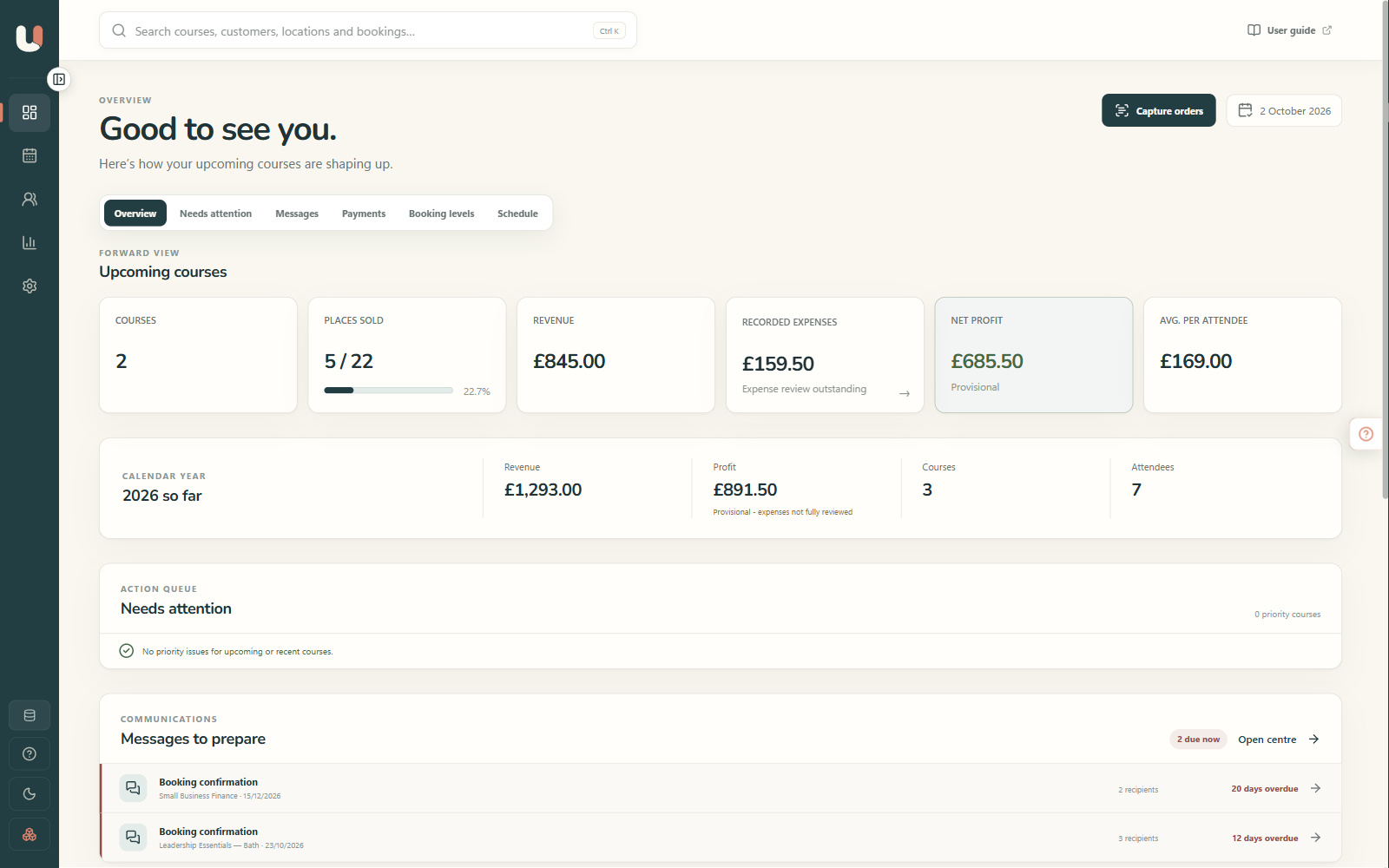
Know what needs attention
See upcoming capacity, missing details, overdue payments, communication tasks and waiting-list opportunities before they become problems.
Give every booking context
Keep the customer, course, payments, attendance, notes and communication history connected in one dependable record.
Understand what earns
Compare revenue, recorded costs, occupancy and profit by course, venue, type or period—without rebuilding a spreadsheet.
One joined-up workflow
From first booking to final figures.
The details you add once remain useful throughout the whole course lifecycle.
-
Plan
Set dates, capacity, venue or online details, reusable checklists and expenses.
-
Book
Add attendees, deposits, instalments, refunds, transfers and waiting-list places.
-
Deliver
Prepare joining information, check people in and keep an accurate attendee record.
-
Learn
Review occupancy, income, costs and profit, then use what worked next time.
Built for the detail
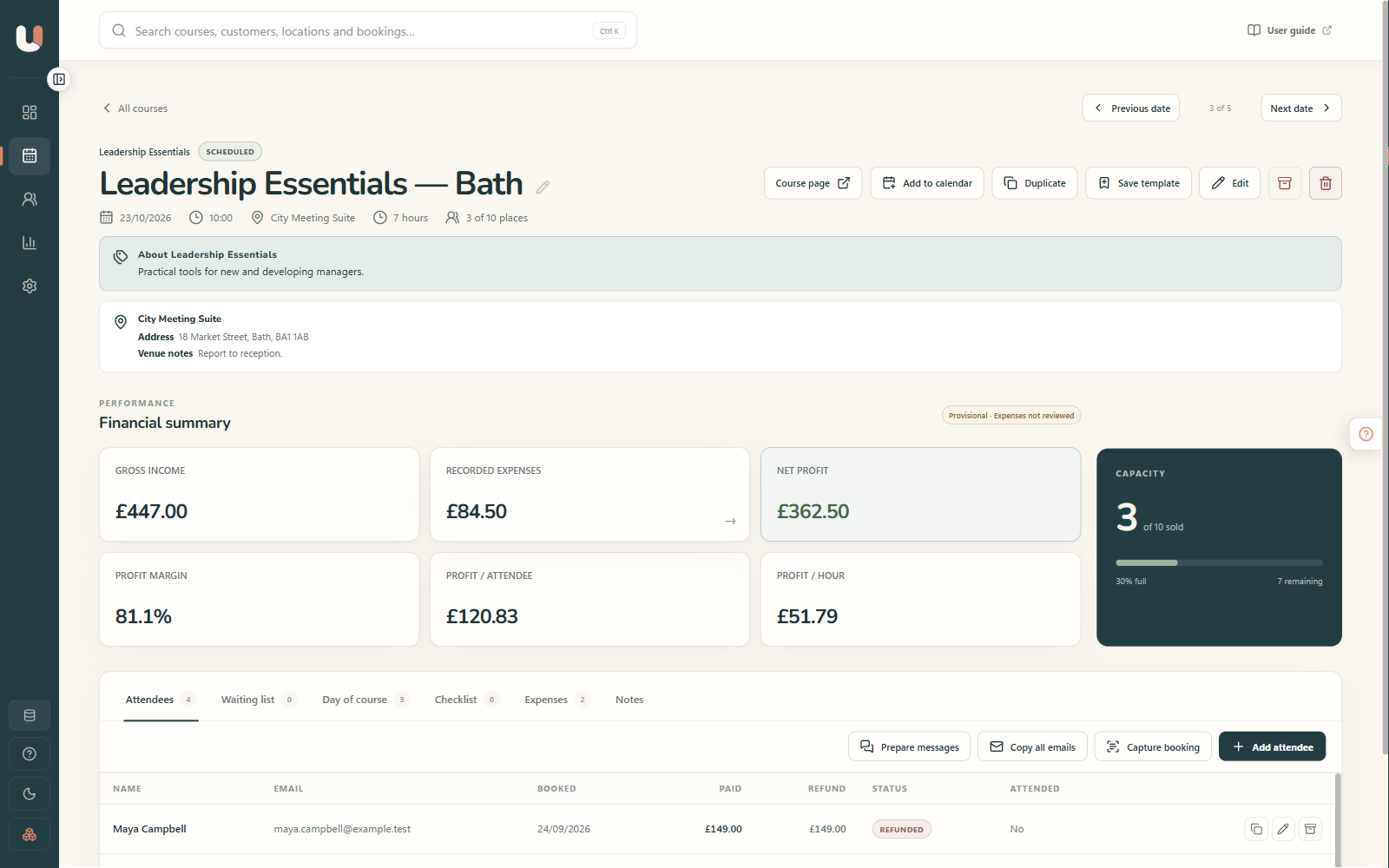
Everything for one course, in one place.
Open a course and see the operational story—not fragments spread across a calendar, inbox and spreadsheet.
- In-person, online, multi-day and repeating courses
- Capacity, bookings, attendance and waiting lists
- Deposits, instalment plans, refunds and transfers
- Reusable checklists and course templates
- Personalised messages that you review before sending
- On-the-day check-in and printable attendee sheets
Private, local analysis
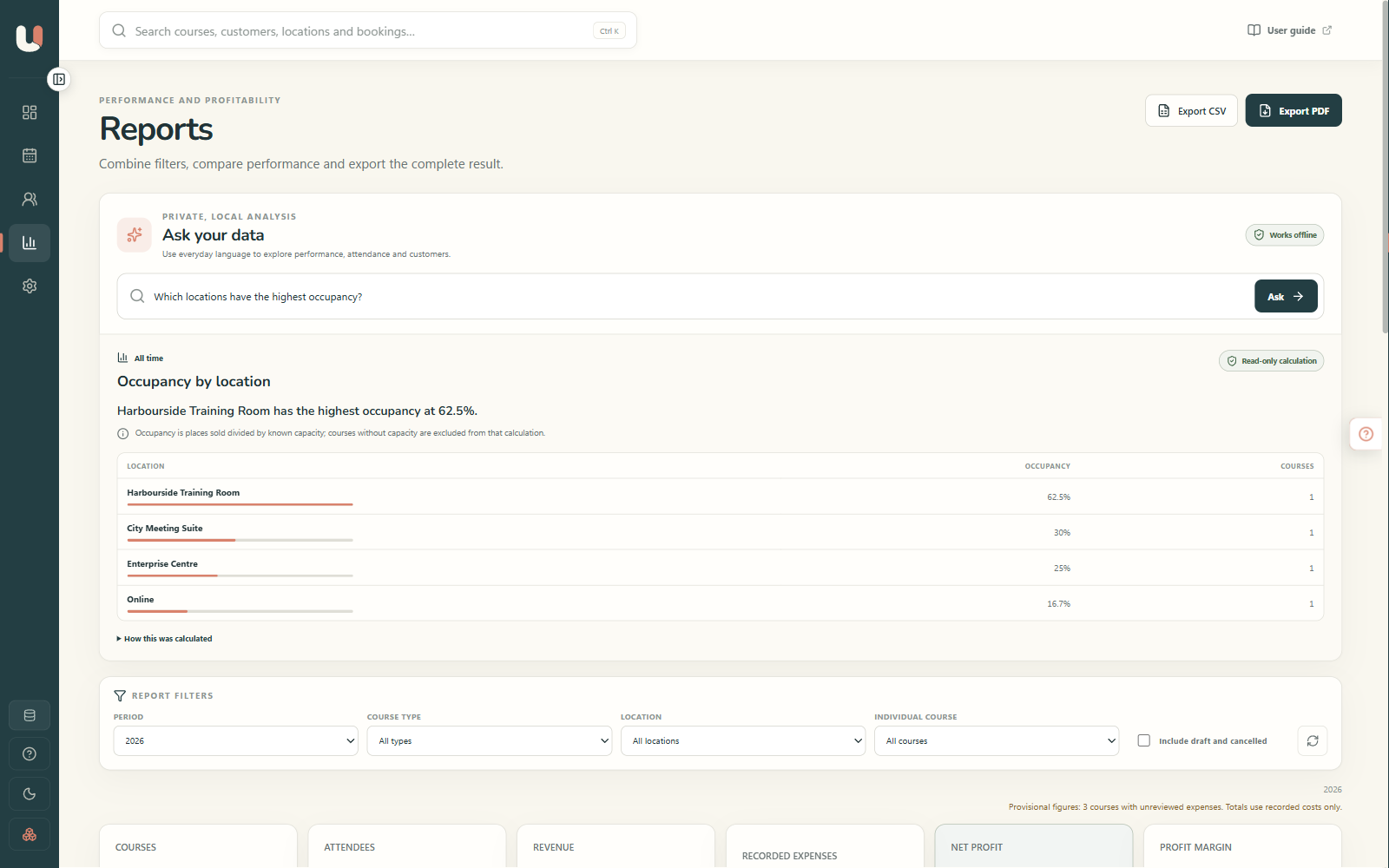
Ask a question. Get a useful answer.
Explore performance, attendance, customers, venues and available places in everyday language. Answers use tested, read-only calculations and run entirely on your computer.
- Which courses are empty?
- Who has attended the most?
- Where is occupancy highest?
- What made the most profit last year?
If a question could mean more than one thing, the app asks you to clarify instead of silently guessing.
Clarity beyond turnover
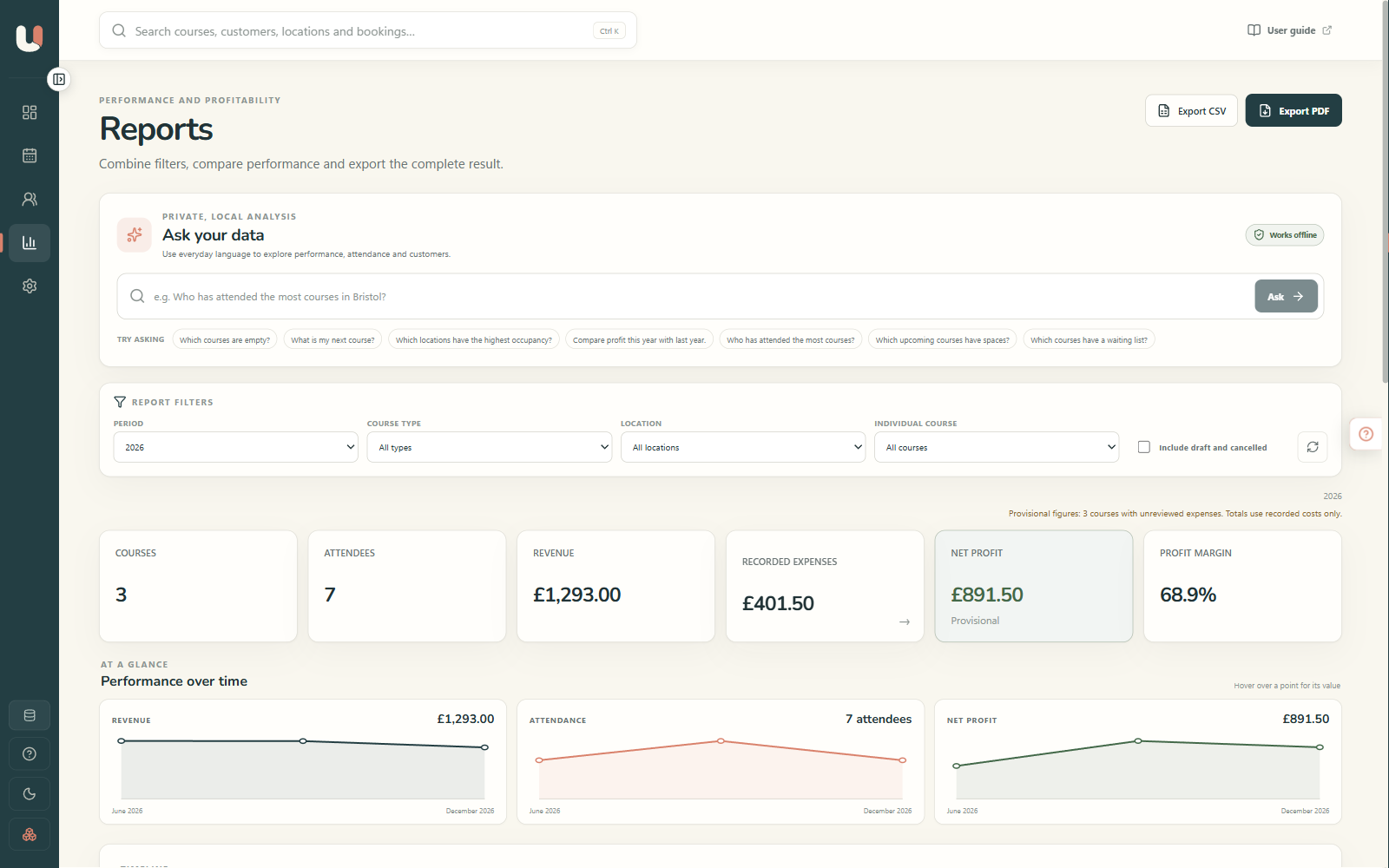
See which work is actually working.
Revenue is only part of the story. Record costs and compare occupancy, net profit, margin, profit per attendee and profit per hour.
- Filter by period, course type, venue or individual course
- Compare monthly performance and longer-term trends
- Keep scheduled payment-plan cash separate from earned revenue
- Mark incomplete expenses as provisional—not falsely final
- Export the current view to PDF or CSV
Your customers. Your records. Your computer.
Business software without giving up control of the business.
Local by design
Your course, customer and financial records live in database files you choose. Reporting and Ask your data work offline.
Protected, not trapped
Create automatic or manual backups, restore safely, run read-only health checks, and export reports whenever you need them.
Helpful—not over-automatic
The app prepares messages and identifies likely booking details, but you review the result. It never sends customer messages automatically.
One price for Version 1
Buy a perpetual Version 1 licence, including every Version 1.x update. There is no monthly software subscription.
Useful Course & Class Manager
For independent trainers who want capable business software without another monthly bill.
- Permanent Version 1 licence
- Every Version 1.x update included
- Full seven-day trial before purchase
- Signed Windows desktop installer
- Your business data stays local
Secure checkout and tax handling will be provided by Paddle.
Try first. Decide with your own data.
Seven full days. Nothing held back.
The trial starts on first launch and includes every feature. When it ends, editing pauses—but your data remains available to view, back up and export.
- Trial
- Seven calendar days from first launch, managed locally by the app.
- Purchase
- One-off Version 1 licence rather than a recurring subscription.
- Updates
- All 1.x updates are included. A future major Version 2 may be a separate paid upgrade.
- Payments
- Paddle will process checkout and applicable taxes once the purchase flow is enabled.
Good questions
Before you download.
A clear answer now is better than a surprise later.
Which computers are supported?
The current release is for 64-bit Windows PCs with an Intel or AMD processor. The technical minimum is Windows 10 version 22H2, although Windows 11 is recommended because standard Windows 10 support has ended. Windows on ARM is not currently tested or supported.
What are the minimum computer specifications?
Allow at least 4 GB of memory, 1 GB of free storage plus space for your databases and backups, and a 1280 × 720 display. For the most comfortable experience—particularly when reviewing PDFs or using local text recognition—we recommend 8 GB of memory and a 1440 × 900 or larger display.
Is there a Mac version?
Not yet. Version 1 is currently available for Windows, and a macOS version is planned. Its release date and exact Mac requirements will be published after the signed Mac build has completed compatibility testing.
Is this an online booking website?
No. It is a private Windows desktop manager for the bookings and customer records your training business receives. It does not currently add a public self-booking or card-payment page to your website.
Can it work with bookings I already receive?
Yes. Add bookings directly, import suitable existing data from CSV, or locally review booking details captured from saved emails, PDFs, screenshots, images and text files. Nothing is written until you confirm it.
Does it send emails automatically?
No. It prepares personalised confirmations, reminders, joining information and follow-ups, then lets you review, copy or open them in your email app. You remain in control of what is sent.
Does it need an internet connection?
Your everyday management, reporting, backups and Ask your data analysis work locally. You will still need internet access for downloading the installer, purchasing a licence, email and any online services you choose to use alongside it.
What happens after the seven-day trial?
Editing is locked until you enter a Version 1 licence. Your existing data remains available to view, back up and export, so the trial does not hold your records hostage.
Can I use my own terminology?
Yes. Choose Workshop, Class, Course, Session, Event or Programme—or enter your own singular and plural wording for each database.
Can I keep different organisations separate?
Yes. Each portable .uwm database has its own courses, customers, finances, wording, branding and settings. Open the database you need when you need it.
Is £99 a subscription?
No. It buys a perpetual Version 1 licence and every 1.x update. A future major Version 2 may be offered as a separate paid upgrade.
Ready when you are
Less chasing. More clarity. Better training days.
Try the complete app for seven days with no feature restrictions. Use example data first, or create a database for your own business.
Download the free trialUseful Course & Class Manager · Version 1 · Windows desktop